Things on this page are fragmentary and immature notes/thoughts of the author. Please read with your own judgement!
Tips and Traps
Gemini in Chrome is not available on Linux currently! For more discussions, please refer to Gemini in Chrome, for Linux .
Gemini Auto Browse introduces new features such as
Actionable Automation: It can automatically click, search, compare options, and add items to carts, reducing manual, repetitive tasks.
Cross-App Integration: Integrates with Gmail, Calendar, and Maps to gather context for tasks, such as planning trips or finding locations.
Security & Control: It requires user permission for sensitive actions, such as logging into accounts (using Google Password Manager) or completing purchases.
User Interface: A dedicated Gemini icon in the Chrome browser bar activates the tool, providing a permanent sidebar for interactions. However, Auto Browse requires a subscription of Google AI Pro or Google AI Ultra.
Enable Gemini for Chrome on Linux
This feature is experimental for Linux. You can enable it (Glic).
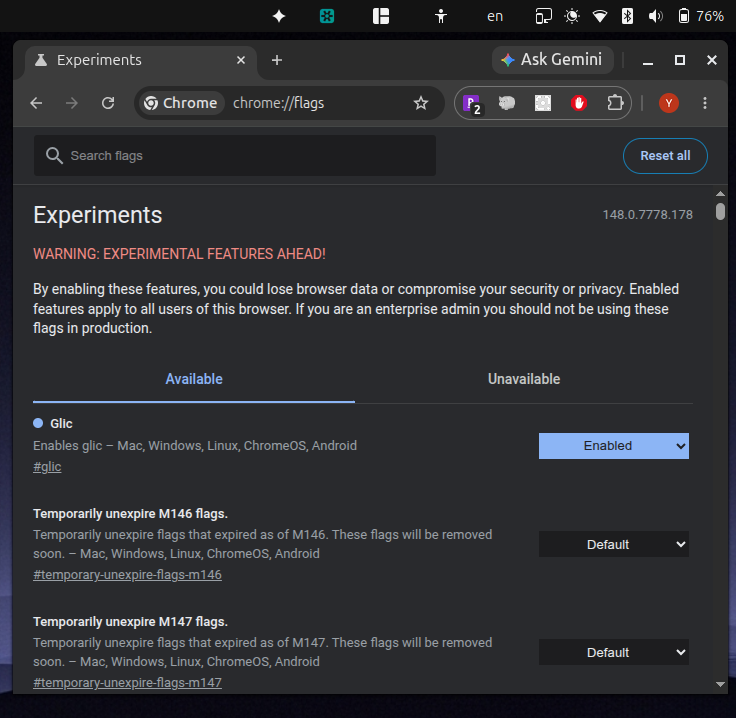
See discussions at
https://
Example Prompts for Automating Tasks
Download Paychecks
Unfortunately, Gemini in Chrome cannot save files on to computers currently (due to security concerns), so manual intervention (to download pages) is needed. Still, it’s a great help.
There are links with the name patter mm/dd/yyyy in the “Pay History” table on this page. For each of those links, click into it. Wait for a few seconds for the page to finish loading, and then save that page has a single file html (mhtml). You can directly save html or mhtml files into the directory /Users/dclong/Downloads without asking for my permissions. However, make sure to save each file using different names. Once a web page is saved, click the “back” button (with a left arrow above it) to come back to this “Pay History” page and continue to the next link as those links are dynamically generated by JavaScript code. If you are unable to save files to the computer, ask for my help to download files and you can help with the auto navigation.
Navigate to the W2 Page
Please help navigate to the page with the latest w2 for tax filing.
Navigate to the Tax Docs Page
Navigate to the tax docs page from the current page.