Things on this page are fragmentary and immature notes/thoughts of the author. Please read with your own judgement!
Comments
PIL.ImageGrab works on macOS and Windows only.
PIL.ImageGrabis relatively slow.python-mssandPyQt5are better alternatives if performance of screenshot is critical. Notice that saving an (e.g., PNG) image can take significant time (might take up to 0.5 seconds) too, this is often due to image compression is slow. Lower the compression level can significant reduce the time needed to save an image. Please refer to Saving a PNG file is slow for more discussions.You can further crop a screenshot image using the method
PIL.Image.crop.If you are using macOS, you need to grant
Screen Recordingaccess to your application viaSystem Preferences.... For example, if you run Python in Hyper, you need to grant Hyper permission to accessScreen Recording.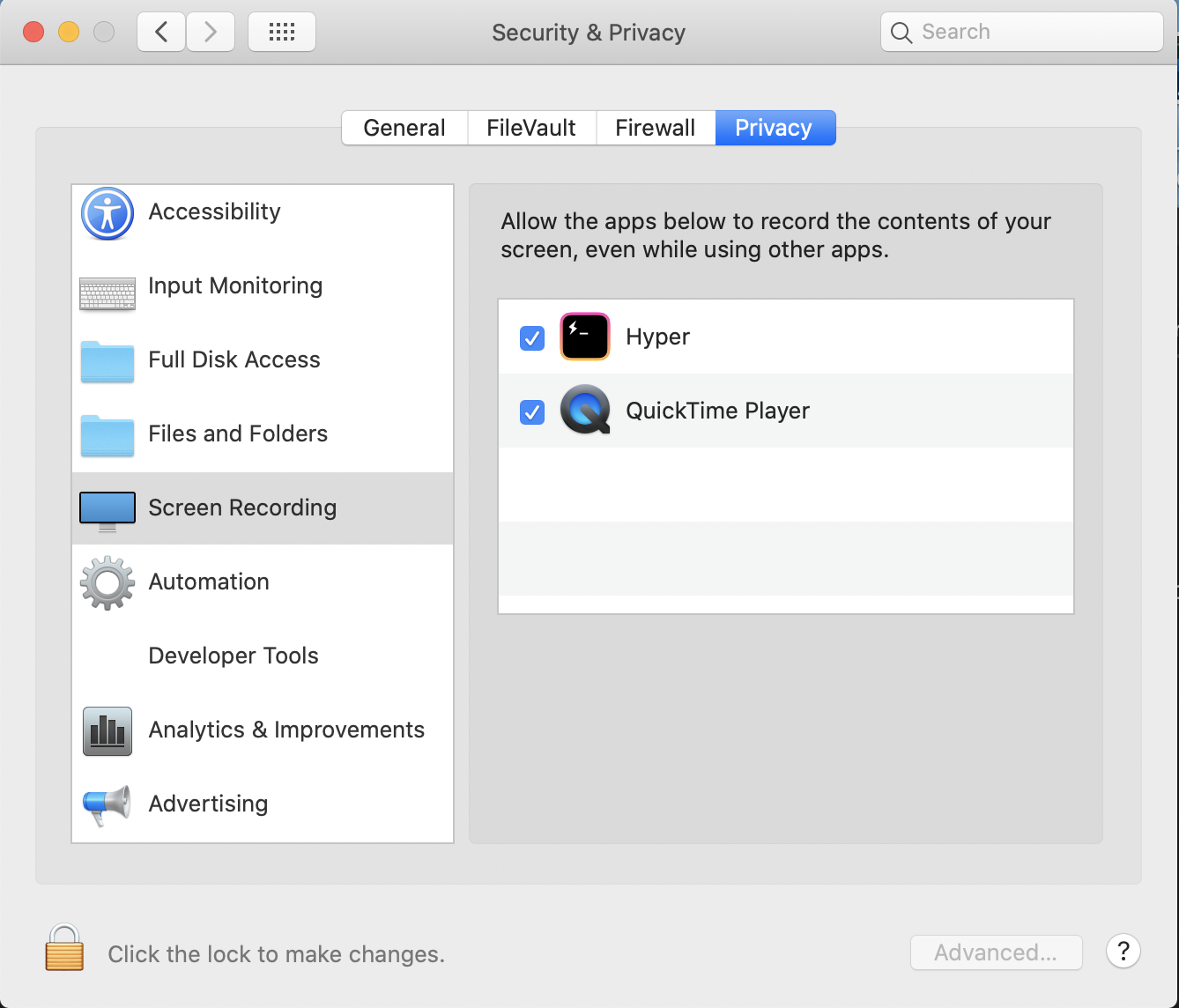
Pillow
import numpy as np
from PIL import Image, ImageGrab
---------------------------------------------------------------------------
ImportError Traceback (most recent call last)
<ipython-input-29-7e658ee09610> in <module>
1 import numpy as np
----> 2 from PIL import Image, ImageGrab
/usr/local/lib/python3.7/dist-packages/PIL/ImageGrab.py in <module>
27 import subprocess
28 else:
---> 29 raise ImportError("ImageGrab is macOS and Windows only")
30
31
ImportError: ImageGrab is macOS and Windows onlyImageGrab.grab(bbox=(10, 10, 510, 510))pyscreenshot
pyscreenshot is a simple wrapper over various back-ends. Please refer to the Features section for supported back-ends. One of the back-ends must be installed for pyscreenshot to work.
import pyscreenshot as pyss

pyss.grab()
---------------------------------------------------------------------------
FailedBackendError Traceback (most recent call last)
<ipython-input-32-df871433ae1f> in <module>
1 import pyscreenshot as pyss
2
----> 3 pyss.grab()
~/.local/lib/python3.7/site-packages/pyscreenshot/__init__.py in grab(bbox, childprocess, backend)
41 otherwise back-end is automatic
42 """
---> 43 return _grab(childprocess=childprocess, backend=backend, bbox=bbox)
44
45
~/.local/lib/python3.7/site-packages/pyscreenshot/__init__.py in _grab(childprocess, backend, bbox, filename)
27 if childprocess:
28 log.debug('running "%s" in child process', backend)
---> 29 return childprocess_grab(_grab_simple, backend, bbox)
30 else:
31 return _grab_simple(backend, bbox, filename)
~/.local/lib/python3.7/site-packages/pyscreenshot/childproc.py in childprocess_grab(_grab_simple, backend, bbox)
32 def childprocess_grab(_grab_simple, backend, bbox):
33 if POPEN:
---> 34 return childprocess_grab_popen(backend, bbox)
35 else:
36 return run_in_childprocess(_grab_simple, codec, backend, bbox)
~/.local/lib/python3.7/site-packages/pyscreenshot/childproc.py in childprocess_grab_popen(backend, bbox)
52 if p.return_code != 0:
53 # log.debug(p)
---> 54 raise FailedBackendError(p)
55
56 data = open(filename, "rb").read()
FailedBackendError: <EasyProcess cmd_param=['/usr/bin/python3', '-m', 'pyscreenshot.cli.grab_to_file', '/tmp/pyscreenshotqpisq00z/screenshot.png', '0', '0', '0', '0', '--backend', ''] cmd=['/usr/bin/python3', '-m', 'pyscreenshot.cli.grab_to_file', '/tmp/pyscreenshotqpisq00z/screenshot.png', '0', '0', '0', '0', '--backend', ''] oserror=None return_code=-6 stdout="" stderr="qt.qpa.xcb: could not connect to display
qt.qpa.plugin: Could not load the Qt platform plugin "xcb" in "" even though it was found.
This application failed to start because no Qt platform plugin could be initialized. Reinstalling the application may fix this problem.
Available platform plugins are: eglfs, linuxfb, minimal, minimalegl, offscreen, vnc, xcb.
" timeout_happened=False>PIL.ImageGrab.grab(bbox=(10, 10, 510, 510))python-mss
python-mss
is an ultra fast cross-platform multiple screenshots module in pure Python using ctypes.
It is about 10 times faster than Pillow.Image.grab.
from mss import mss

# The simplest use, save a screen shot of the 1st monitor
with mss() as sct:
    sct.shot()
import mss
import mss.tools
with mss.mss() as sct:
# the screen part to capture
monitor = {"top": 160, "left": 160, "width": 160, "height": 135}
# grab the data
sct_img = sct.grab(monitor)
# save the screenshot as a PNG image
output = "sct-{top}x{left}_{width}x{height}.png".format(**monitor)
mss.tools.to_png(sct_img.rgb, sct_img.size, output=output)
print(output)Convert the data to a Pillow Image.
from PIL import Image

img = Image.frombytes("RGB", sct_img.size, sct_img.bgra, "raw", "BGRX")mss.mss.grab
Takes a dict (containing keys “left”, “top”, “width” and “height”) and parameter.
Unlike Pillow.Image.grab,
mss.mss.grab uses the same coordinates shown on the screen.
However,
the resulting image’s dimension (width * 2, height * 2).
PyQt5
from PyQt5.QtGui import QPixmap, QApplication
from datetime import datetime

app = QApplication([])
while True:
    date = datetime.now()
    filename = r"C:/%s.jpg" % date.strftime("%m/%d/%Y_%H.%M.%S-%f")
    QPixmap.grabWindow(QApplication.desktop().winId()).save(filename, "jpg")